Most franchise management software evaluations start in the wrong place and with the wrong question.
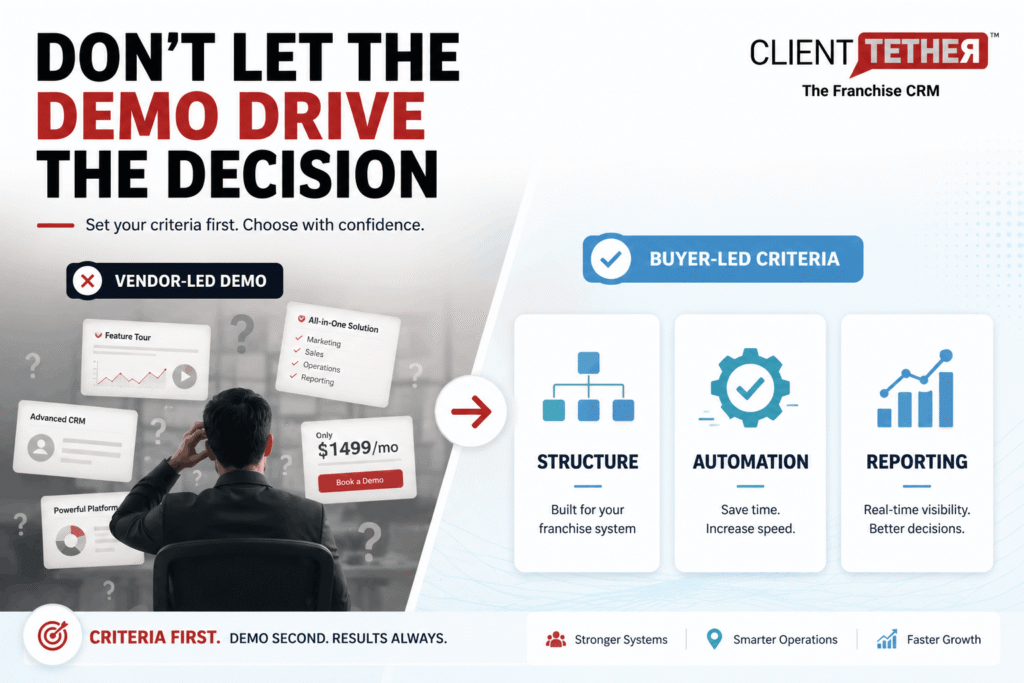
The typical process franchise leaders follow is to look at a few systems they have heard of or used before, book three demos, compare pricing, and make a choice. The problem is that without set criteria, each demo looks good. Vendors show their best screens. You leave each call impressed and no clearer on which platform fits your system.
Franchise executives are still asking the wrong question: Which system can do everything we need in one platform? The real answer to that question is – Nobody. Some systems are a mile wide and an inch deep, but no franchise system actually wants a collection of mediocre and often overpriced tools.
This guide reverses that process by helping you set the right criteria first, and ask the right questions. Then put each vendor through the same process. Then, you’ll know what red flags look like before you sign.
Buying franchise management software the right way starts with truly assessing your needs before any vendor contact. Then you run each platform through the same process to tell native franchise tools from adapted generic ones. Total cost is almost always higher than the subscription price. And there are specific red flags in a demo that tell you when to walk away.
Key Takeaways
- Write down your required needs gathered from your whole team before booking demos. Without them, each platform looks like a fit.
- Ask each vendor the same initial questions. The answers reveal whether the platform was built for franchising or adapted from a general CRM.
- Total cost includes what the platform costs to deploy, maintain, and all 3rd party plugins to make it work, not just the subscription fee.
- Red flags in a demo: Highly custom setup as a “selling point”, third-party FDD tools, no live speed-to-lead test, broad claims of all-in-one functionality.
- Strong franchise management software produces real results: 278% lead conversion lifts, 300% sales growth, and close rates that double the baseline.
Who This Is For
- Best for: VP or Director of FranDev preparing a platform review; franchise CEO or COO leading the buying call; operations leaders comparing platforms for a growing system
- Not ideal for: Non-franchise brands
- Top use cases: Running a structured vendor review; building an internal scoring guide; preparing demo questions before vendor calls
Set Your Needs Before You Talk to Any Vendor
The most common mistake in a franchise management software review is starting with demos.
Demos are built to show strengths. When you walk in without set needs, you review each platform on its own terms. You end up comparing different things across different vendors and have no clear basis for a choice.
Before any vendor contact, write down your non-negotiable requirements, your high-priority wish list, and nice-to-haves. This list needs to be compiled from internal discussions with all stakeholders that will be using the system to support your franchise growth. Also, break out these categories of requirements across each component of your full franchise management software needs by functional area. As an example, you should have specific requirements for your LMS, your FranDev CRM, your Intranet, your franchise owner communication tools, field audit tools, etc.
Your use case. Have you already got an excellent LMS, so you really just need to fill in the rest of the holes in your tech stack? Is your FranDev tool too expensive and clunky and not moving the needle for your team? The answers change, which features are required, and which vendors are worth your time. Most platforms do one or two aspects of franchise operations management well. Knowing what you really need filters the list before you start.
Your current pain points. Where is your pipeline breaking right now? Speed to lead? Candidate gaps between stages? Field audit tools? Reporting? Franchise owner communications? Work with your team to create this list, because it becomes the structure for defining requirements to grade each platform you review.
Required vs. optional. Write both lists before talking to anyone. A required feature is one that the platform must have to satisfy the requirements for your system. An optional feature is one you want but can live without. Vendors will show you optional features to distract from the missing required ones. Having the list in writing keeps the review honest. Look for “glazing” during your demos. Often, vendors will skip over questions or refocus your energy on their strengths rather than directly address deficiencies in their franchise management platforms.
The 2025 IFA Franchisor Survey shows that technology adoption ranks among the top growth priorities for franchise brands, yet most systems report switching platforms within three years of their first choice. Setting needs up front is the single strongest predictor of a good first decision.
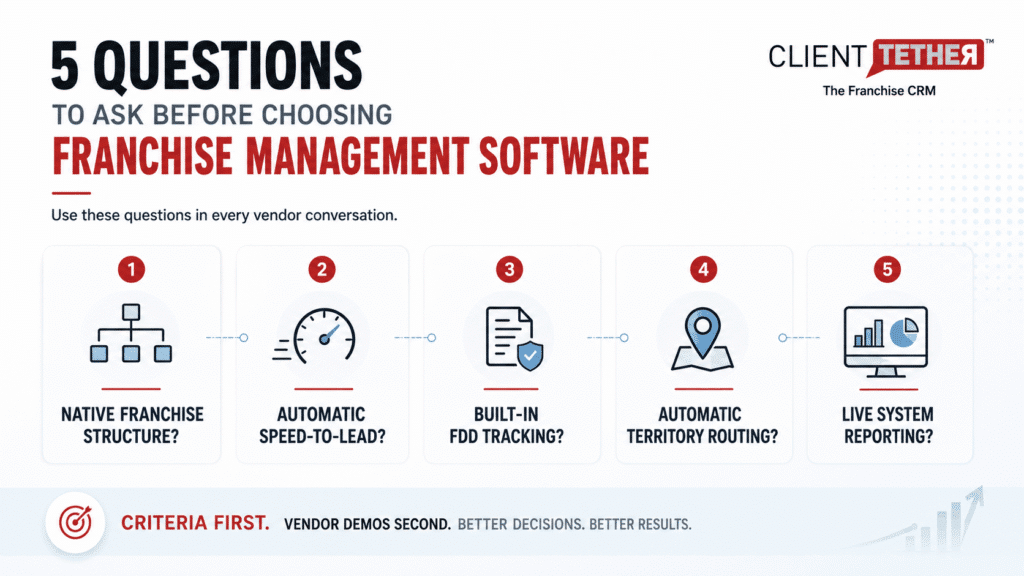
5 Questions to Ask Each Franchise Management Software Vendor
Run each vendor through these five questions in each demo. The goal is not to find a vendor who answers well. The goal is to get the same answer from each vendor and understand what the gaps mean.
Before the demos start, build a simple scoring sheet so every vendor gets evaluated against the same criteria. Make sure to share the list of requirements with the vendor, so they can follow your process with their demo. This alignment beforehand will ensure as uniform and fair a process for them as possible.
The goal is not to score presentations. The goal is to compare how each platform actually handles franchise operations at scale. Here are some examples of what you may want to consider:
| Evaluation Criteria | Vendor A | Vendor B | Vendor C |
|---|---|---|---|
| Native franchise structure | |||
| Built-in FDD workflow and disclosure tracking | |||
| Automated speed-to-lead response | |||
| Centralized franchise owner communication | |||
| System-wide reporting across all units | |||
| Unit-level operations support | |||
| Built-in messaging and follow-up automation | |||
| Field audit support | |||
| Setup timeline and cost | |||
| Pricing model (per seat vs. per account/location) | |||
| Required third-party tools to meet needs (and costs) | |||
| Estimated total monthly cost | |||
| Data migration costs (and process) | |||
| Ongoing support and onboarding | |||
| Contract flexibility |
If a vendor struggles to answer multiple rows clearly during the demo, that usually tells you more than the polished presentation itself. And if they appear to have missed something, make sure you circle back to it with them to ensure they didn’t accidentally overlook it.
1. Is the platform purpose built for franchising, or is the setup a fully custom build?
This is the most important structural question. Native parent-child structure means the platform was built from the start to handle a hierarchy of franchisor, multi-unit owner, and individual unit. A custom build means a general CRM was adapted to copy that structure. The gap shows up in reports, access control, and data quality at scale. Ask to see it live, not in a slide.
2. How does FranDev speed to lead work — is the response automatic, timed, and logged, or does it depend on a rep catching the lead?
Speed-to-lead is the most valuable lever in any FranDev pipeline. Responding to a candidate in under 5 minutes vs. 30 minutes raises the qualification rate by 21 times. A platform that relies on a rep to manually reply cannot guarantee that speed each time. Ask the vendor to show an automatic response from lead entry to first contact in real time during the demo. Then, verify if they require any third-party software to deliver those results. Dig into costs, compliance risks, and third-party support if something goes wrong.
3. Is FDD delivery and disclosure tracking built in, or does it need a third-party tool?
FDD delivery, opens, and e-signature belong natively inside the franchise CRM tool, not outside it. When it requires a separate tool or manual step, disclosure events can fall through gaps in your workflow. A platform with FDD tracking built in keeps the full candidate path in one audit trail.
4. What do your current clients use and like the most within your platform?
No matter how broad their platform is, most franchise management suppliers have specific aspects of their systems that their clients like the most. Knowing their strengths and even weaknesses can help you decide which components of their tools you should consider using. The idea that you should use an entire end-to-end platform is unreasonable. It’s akin to assuming that because you like the Ford F-350 towing capacity for your excavation business, you should buy only Ford tires, Ford shovels, Ford Dump trucks, and a Ford Backhoe. While loosely related, there’s no way Ford could possibly be the best-in-class provider for all of these tools.
5. What additional personnel, customization support, 3rd party add-ons, and additional internal team time will this platform require for you to use it effectively?
I once asked a franchise executive how much his FranDev CRM cost him each month. His initial response was $1500.
Then we discovered that he had a 20-hour-per-week admin working with his big-box CRM to try to make it work for his organization. This added $3500 per month to his costs.
He had a few add-ons he needed to bolt onto his tool to get a moderate level of automation working for his operators. This added another $1500 per month to his costs.
We couldn’t truly quantify the time wasted on poor workflows and UI, which would have compounded the costs even more. But his hard costs per month were more than 4X his initial estimate of his franchise technology costs..
How to Calculate Total Cost
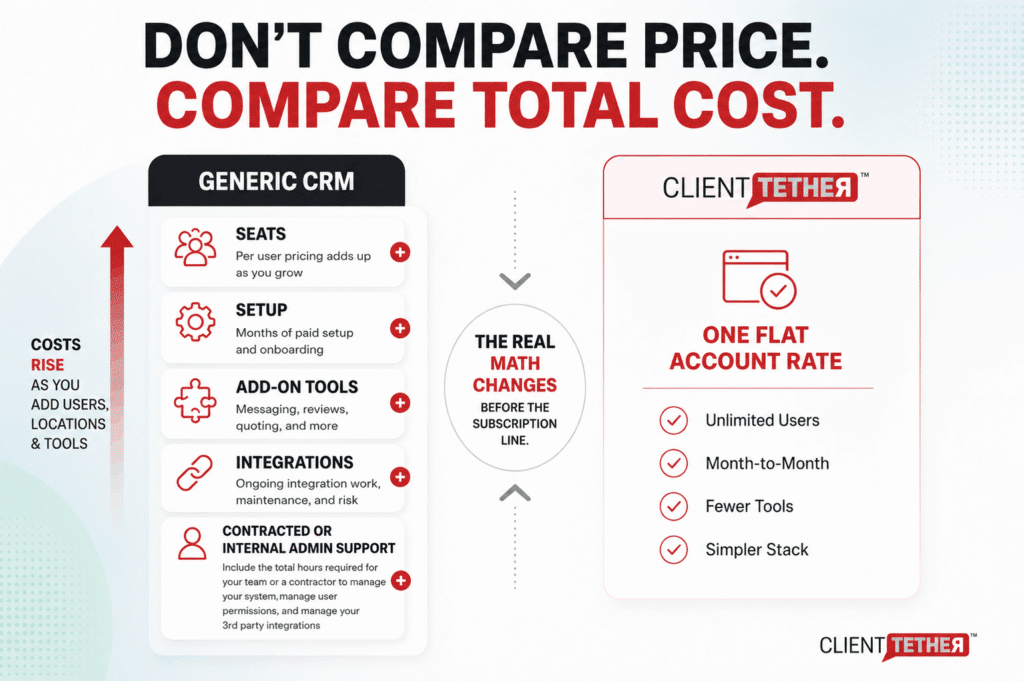
The subscription price is the easiest number to compare and sometimes the least useful one.
Before comparing two platforms on price, build the full current cost of your existing stack. What does your current CRM cost? Your messaging tool? Your review platform? Your quoting tool? A platform that replaces all of those changes the math before you even look at the subscription line.
Per seat vs. per account pricing: Generic CRMs price by user seat. At 50 locations with multiple staff per unit, the seat count adds up fast — and it grows every time a franchisee hires someone. ClientTether uses a flat monthly rate per account with unlimited users included at no extra charge. The more your system grows, the wider that total cost of ownership gap gets.
Setup cost and onboarding: ClientTether charges a one-time setup fee that covers onboarding and training. There are no ongoing support fees, no data storage fees, and no long-term contracts — the platform runs month to month with a 30-day cancellation notice. Enterprise CRMs routinely require 12-months of paid licensing before the system goes live. Sometimes that is paid before configuration is completed. That lag between purchase and actual use has a real revenue cost at any meaningful conversion rate. Beware onboarding estimates that are based upon hours. These are often used to create the perception of a lower cost upfront, but they almost always don’t represent the true amount of time needed for you to be successful. You’ll find yourself going back to the well, adding hours and costs multiple times before finalizing your project.
Integration work: Each separate tool your new platform requires is an ongoing cost and a data quality risk. Platforms with fewer required add-ons are less expensive to run and less likely to break.
Franchise technology trends from FranchiseWire point to total cost as the main driver behind platform switches in 2026, with fragmented tool stacks as the root cause. The real choice is never platform A vs. platform B. It is full-stack A vs. full-stack B. By full-stack, we mean the total combined cost of the top tier tools you use to create each stack.
For a model of how to calculate ROI before you commit, see how to calculate the ROI before you commit.
Red Flags to Watch For in a Demo
Each of these signals is worth taking seriously. One may be manageable. Several together is a pattern.
“We can set it up for franchises.” A custom setup is not the same as a native structure. A general CRM set up to emulate parent-child data structures with territory rules or some other complex configuration will always have edge cases, report gaps, and limits that a natively built franchise platform does not.
FDD delivery needs a third-party tool: If disclosure tracking lives outside the platform, you do not have a full audit trail in one place. This creates gaps between candidate stages and raises compliance risk.
System reports need a spreadsheet export: Franchisors should not need to export data to see their system performance. If the demo shows a report that required prep work or an export before the call, that is a signal about what daily use will look like.
No live speed-to-lead demo: Any platform that handles FranDev should be able to show automatic lead response live in a demo. If the vendor cannot show this in real time, it is worth asking why.
Setup takes 90 or more days as standard: Longer setup delays your ROI and raises the risk of the project stalling. A platform that goes live in under 30 days starts generating results three months earlier.
They recommend using a 3rd party implementation partner: This defrays the accountability, weakens support, and incentivizes the 3rd party partner to find ways to create dependency on their services vs. independence. This is always a more expensive option in the long run.
What Strong Franchise Management Software Delivers
The results below come from ClientTether case studies. These are real outcomes, not projections.
The Maids International, after years of operating in an industry standard franchise CRM, switched to ClientTether and increased its FranDev results by 300% over the next 14 months.
LIME Painting, a residential and commercial painting franchise operating across multiple territories, came in with disconnected workflows and manual customer tracking. Their VP of Operations described the previous state as tedious and time-consuming, with no centralized way to manage leads across locations. After moving to a single platform with automated scheduling and follow-up, productivity improved across the whole network, and onboarding new franchisees became much faster. Centralized unit-level reporting has given them insights for FBCs to coach and support franchise owners.
For a broader look at whether you need franchise management software or a CRM, the comparison article covers the core choice.
For franchise software built around service brand workflows, see franchise software for service brands.
Frequently Asked Questions
What is franchise management software?
Franchise management software is a platform built to manage the needs of a franchise system. At its core, it handles the FranDev pipeline: lead capture, candidate nurturing, FDD delivery, and territory award. More complete platforms also handle unit-level ops, system-level reports, and LMS, field audits, and onboarding and location build-out options.
What is the difference between franchise management software and a CRM?
A CRM tracks contacts and deals. Franchise management software adds the structural layer a franchise system needs: native parent-child structure, t FDD workflow, LMS, field audits, centralized franchise owner communication, and system-level reports across all units. A general CRM can be set up to copy some of these features, but the result is always a workaround rather than a native build.
How much does franchise management software cost?
Pricing varies by platform type. General CRMs set up for franchising are priced by user seat, which can create rapid cost growth. Purpose-built franchise platforms are priced by location or brand, keeping costs stable as the system grows. Total cost is almost always more than the subscription line item once you count everything required to operate and support your franchise technology.
What features should franchise management software have?
Required features for an active FranDev operation: automatic speed-to-lead response, FDD delivery and disclosure tracking, LMS, field audits, centralized franchise owner communications, and system-level reports across all units. Optional features include multi-brand management, intranet, store opening tracking
What is the best franchise management software for small franchises?
The right platform depends on your use case and growth stage. Systems with no operating units can often manage with a properly set up general CRM and a project tracking system like Asana. At 5-10 to units with active FranDev, purpose-built franchise software, like ClientTether, starts to pay off in time savings and conversion gains. Above 10 units or 30 or more active franchise candidates, a native franchise structure becomes required.