
Save admin time and ensure response in minutes
Assign leads automatically for a personalized engagement experience
Intelligent Lead Routing for Every Scenario
Automatically assign leads based on location, expertise, availability, or round-robin rotation

Territory-Based Routing
Automatically assign leads to team members based on geographic territory, ZIP code, or service area for local expertise and faster response.
-
 Define custom territories by region, city, or ZIP
-
Automatic assignment based on lead location
-
Overflow rules for coverage gaps
 Define custom territories by region, city, or ZIP

Skills-Based Routing
Match leads with team members who have the right expertise, certifications, or product knowledge to handle specific inquiries.
-
Route by expertise, product line, or service type
-
Prioritize senior reps for high-value leads
-
Language or certification matching

Round-Robin Distribution
Ensure fair, balanced lead distribution across your team with automatic round-robin rotation that prevents bottlenecks.
-
Equal distribution across team members
-
Weighted rotation based on capacity
-
Skip unavailable or at-capacity reps

Availability-Based Routing
Assign leads only to available team members based on work schedules, time zones, current capacity, and real-time status.
-
Respect working hours and time zones
-
Skip team members at capacity
-
After-hours fallback routing
Instant Notifications for Immediate Action
When a new lead enters the system, ClientTether automatically routes it to the designated team member

Push Notifications
Create automated calling sequences as part of your existing Action Plans.

Email Alerts
Assign calls to the right team members based on territory, expertise, or availability.

Network-Wide Visibility
Monitor and track conversion rates across all franchise locations from a single dashboard view.
Streamline Franchise communication and ensure no opportunity is lost
Complete Visibility Into Every Lead's Journey
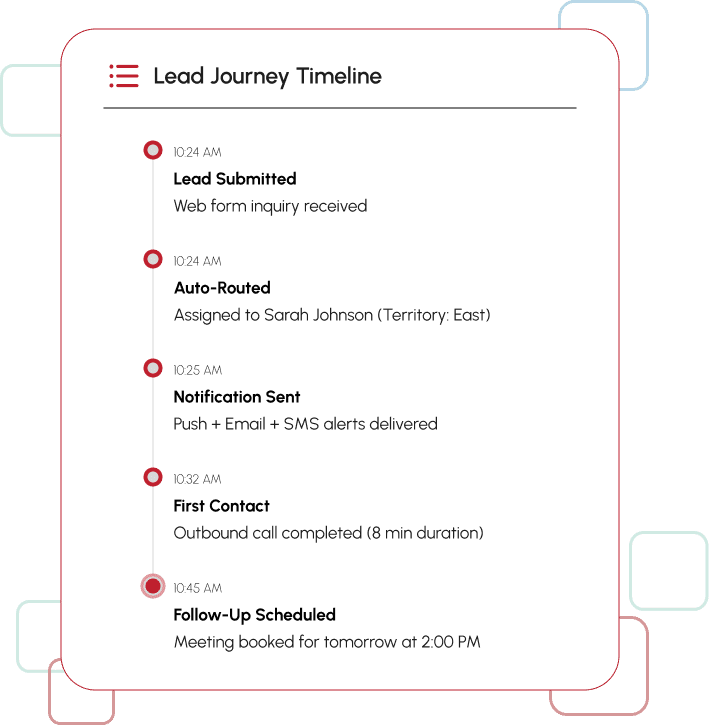
All communications and updates are tracked within the CRM, providing complete visibility into the lead's journey over time.
-
 Communication Tracking
Every call, text, email, and note logged automatically for full context. -
Lead History Timeline
View the complete journey from first contact to closed deal in one place. -
Assignment Audit Trail
Track routing decisions, reassignments, and team member actions over time. -
Response Time Analytics
Monitor how quickly leads are contacted and engaged by your team.

Integrated with Workflow Automation
Routing rules can trigger additional actions beyond assignment, creating a complete lead management ecosystem
Lead Arrives
New lead enters system via form, call, or integration
Smart Routing
Automatically assigned based on rules
Triggered Actions
-
 Create follow-up tasks
-
Send SMS or email alerts
-
Start nurture sequence
-
Update pipeline stage
Escalation Rules
Alert management if lead remains unassigned or unattended
Example: High-Value Lead
Trigger: Lead value > $10,000
Actions: Route to senior sales rep + Create immediate follow-up task + Send SMS alert + Notify manager
Example: Unattended Lead
Trigger: No contact within 15 minutes
Actions: Escalate to sales manager + Send urgent notification + Create backup assignment
Example: Returning Customer
Trigger: Existing customer submits new inquiry
Actions: Route to original account manager + Pull previous history + Send welcome-back email
Let’s optimize your lead management process

Frequently Asked Questions
Job Routing provides an intuitive visual dashboard where you can see all incoming jobs and available team members at a glance. You can assign jobs with simple click-to-assign functionality, making the routing process quick and easy. The interface updates in real time to reflect changes in job status and team availability.
Team members receive automated notifications for new job assignments, changes to existing assignments, deadline reminders, and job status updates. Notifications can be delivered via email, SMS, or in-app alerts, ensuring that technicians and estimators stay informed no matter where they are.
The workload monitoring dashboard shows real-time capacity for each team member and team, allowing managers to see who is overloaded and who has availability. This visibility makes it easy to reassign jobs to balance capacity, prevent burnout, and maintain consistent service levels across your operation.
Job Routing automatically assigns work to the appropriate franchise location based on service area, team availability, and location capabilities. Ensure faster response times, maintain brand consistency across all locations, and help franchise owners optimize their local ops while corporate leadership maintains visibility across the entire system.
Dashboard reporting provides visibility into job completion rates, team performance ratings, average response times, assignment trends, and capacity utilization. You can track these metrics at the individual, team, location, or company-wide level to identify top performers, spot bottlenecks, and optimize your operations.
Yes, Job Routing integrates seamlessly with ClientTether's workflow automation and system automations. You can set up rules to automatically route jobs based on customer type, service category, priority level, or any other criteria. This integration streamlines the assignment process, reduces manual work, and helps eliminate routing errors.